
AI-Driven Editing And Refactoring
VisualGDB includes a fast AI editing engine, designed to automate the most tedious parts of C/C++ development.
Contents
When to Use
Real-World Examples
Starting AI Edits
Writing Efficient Prompts
Tweaking the Context
Steps
Supported Models
When to Use
The AI engine excels at two main types of tasks:
- AI-driven refactoring. You can quickly move common logic into separate functions/methods or change how functions work, updating references.
- Creating logic from sketches. You can quickly code that integrates with your existing design based on very brief prompts.
The AI edits are not limited to these scenarios. You can always select one or more symbols, give brief instructions, and see if AI can manage it.
Real-World Examples
We have used our AI engine to modify an open-source HTTP server for Raspberry Pi Pico W, turning it into a simple web-controlled thermostat. Instead of creating a project from scratch, we picked a real-world open-source project, and documented every step of modifying it with AI. Checkout these tutorials for details:
- Refactoring Existing Code with AI
- Using AI Edits to Add New Functionality
- Using AI Edits to Create Similar Code
- Using AI to Simplify C/C++ Code
Starting AI Edits
VisualGDB’s AI edits are always tied to symbols, rather than files. You can initiate an AI edit by clicking the edit link next to the CodeJumps annotation on top of a symbol: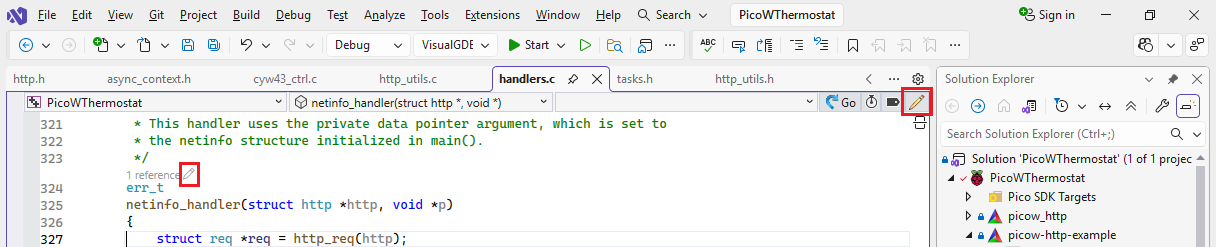
VisualGDB will automatically include all symbols referenced from the current one. E.g. err_t netinfo_handler(struct http) will include the definition of err_t and struct http: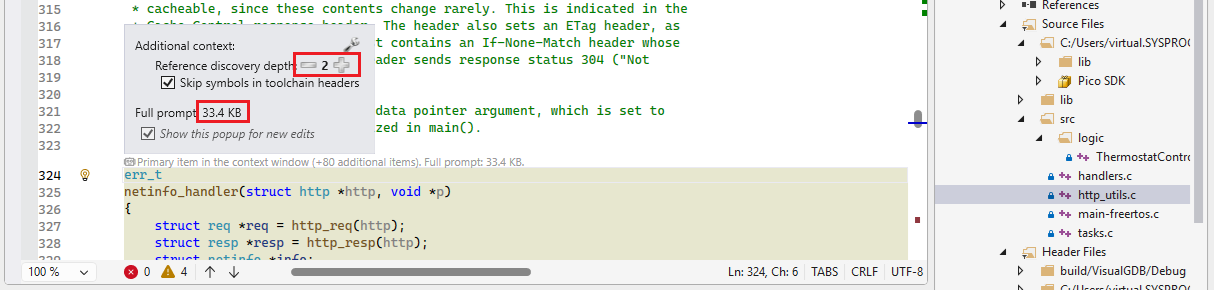
You can control the depth of references discovery (e.g. whether to include types of all fields of struct http) via the depth buttons.
Writing Efficient Prompts
AI can work very efficiently if you use small, concise prompts, focusing on one action at a time. E.g.:
+Thermostat_SetOutputValue(g_Thermostat, bool) wrapping CYW43_WL_GPIO_LED_PIN
This will move the code LED-related code from the current function into a separate function, will create declaration + definition of a new function, and will update the current code to call it.
Whenever you type ‘@’ in the prompt editor, VisualGDB will show the list of symbols visible from the current file, and all files in the project: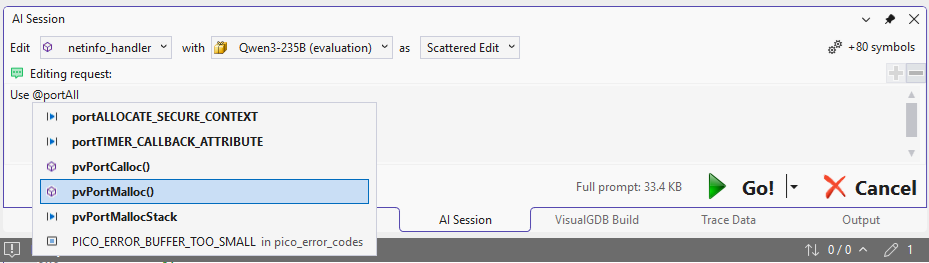 You can use it to reference existing symbols or files, e.g.:
+http_format_and_send() with varargs in @http_utils.c . take contentType + enum http_format_flags (ffNoCache).
measure with sprintf, then @pvPortMalloc + send + @vPortFree
This prompt only took 3 seconds and produced a fully usable 60-line function on first try (see this tutorial).
Tweaking the Context
You can explicitly add individual symbols for the context window by clicking the links near the CodeJumps labels: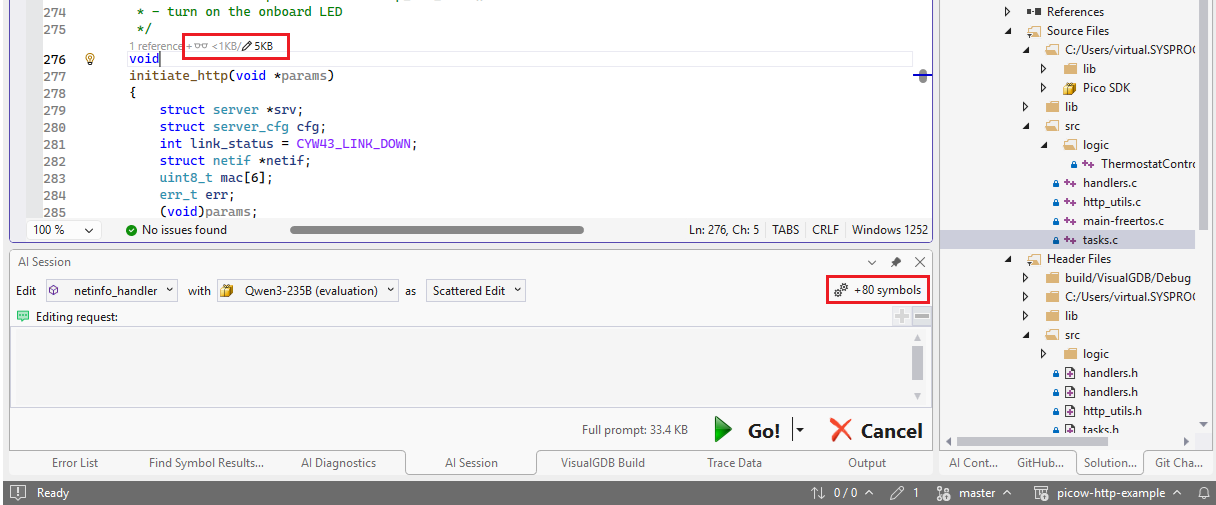 The glasses icon only adds the declaration of the symbol (for classes, also declarations of all methods). The pencil icon adds the symbol body and makes it editable.
You can add symbols at any step of the editing session. E.g. if your code contains multiple functions with duplicate functionality, you can start with editing the first one, refactor the logic into a separate function, and then add the remaining functions asking the AI to update them as well.
Steps
Each time you ask the AI to edit the code, it creates a separate editing step, letting you review the changes: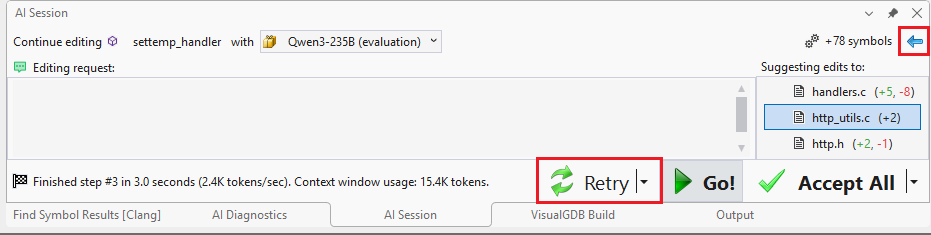 You can use the navigation buttons to go back and forth between the steps, or retry individual steps using the same, or a different language model.
Steps are useful for quick refinement prompts (e.g. malloc->new[]). Just a few words are often sufficient for the language model to correct its previous output.
Supported Models
VisualGDB supports any language model capable of completing chats. You can use any cloud service of your choice, or even run the models on your own hardware. You can configure models via Tools->VisualGDB->Manage AI models: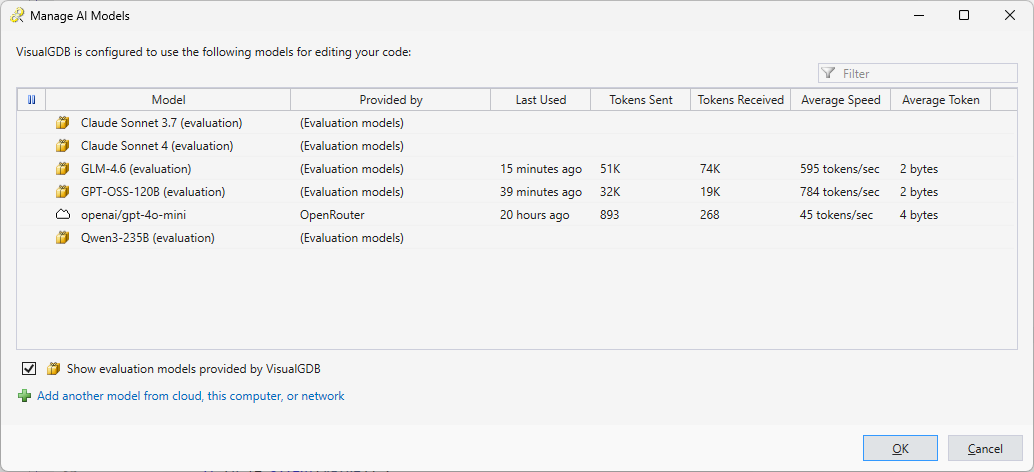 VisualGDB provides a limited number of evaluation tokens for common models. For production use, we recommend creating an account at OpenRouter that provides access to state-of-the-art models from all major vendors. You can also get limited free tokens from Cerebras Cloud or any other model provider with OpenAI-style API.